At our last UDS in Belgium it was notable how many people were interested in the ARM architecture. There have always been sessions at UDS about lightweight environments for the consumer electronics and embedded community, but this felt tangibly different. I saw questions being asked about ARM in server and cloud tracks, for example, and in desktop tracks. That’s new.
So I’m very excited at today’s announcement of Linaro, an initiative by the ARM partner ecosystem including Freescale, IBM, Samsung, ST-Ericsson and TI, to accelerate and unify the field of Linux on ARM. That is going to make it much easier for developers to target ARM generally, and build solutions that can work with the amazing diversity of ARM hardware that exists today.
The ARM platform has historically been superspecialized and hence fragmented – multiple different ARM-based CPU’s from multiple different ARM silicon partners all behaved differently enough that one needed to develop different software for each of them. Boot loaders, toolchains, kernels, drivers and middleware are all fragmented today, and of course there’s additional fragmentation associated with Android vs mainline on ARM, but Linaro will go a long way towards cleaning this up and making it possible to deliver a consistent platform experience across all of the major ARM hardware providers.
Having played with a prototype ARM netbook, I was amazed at how cool it felt. Even though it was just a prototype it was super-thin, and ran completely cool. It felt like a radical leap forward for the state of the art in netbooks. So I’m a fan of fanless computing, and can’t wait to get one off the shelf
For product developers, the big benefit from Linaro will be reduced time to market and increased choice of hardware. If you can develop your software for “linux on ARM”, rather than a specific CPU, you can choose the right hardware for your project later in the development cycle, and reduce the time required for enablement of that hardware. Consumer electronics product development cycles should drop significantly as a result. That means that all of us get better gadgets, sooner, and great software can spread faster through the ecosystem.
Linaro is impressively open: www.linaro.org has details of open engineering summits, an open wiki, mailing lists etc. The teams behind the work are committed to upstreaming their output so it will appear in all the distributions, sooner or later. The images produced will all be royalty free. And we’re working closely with the Linaro team, so the cadence of the releases will be rigorous, with a six month cycle that enables Linaro to include all work that happens in Ubuntu in each release of Linaro. There isn’t a “whole new distribution”, because a lot of the work will happen upstream, and where bits are needed, they will be derived from Ubuntu and Debian, which is quite familiar to many developers.
The nature of the work seems to break down into four different areas.
First, there are teams focused on enabling specific new hardware from each of the participating vendors. Over time, we’ll see real convergence in the kernel used, with work like Grant Likely’s device tree forming the fabric by which differences can be accommodated in a unified kernel. As an aside, we think we can harness the same effort in Ubuntu on other architectures as well as ARM to solve many of the thorny problems in linux audio support.
Second, there are teams focused on the middleware which is common to all platforms: choosing APIs and ensuring that those are properly maintained and documented so that people can deliver any different user experience with best-of-breed open tools.
Third, there are teams focused on advancing the state of the art. For example, these teams might accelerate the evolution of the compiler technology, or the graphics subsystem, or provide new APIs for multitouch gestures, or geolocation. That work benefits the entire ecosystem equally.
And finally, there are teams aimed at providing out of the box “heads” for different user experiences. By “head” we mean a particular user experience, which might range from the minimalist (console, for developers) to the sophisticated (like KDE for a netbook). Over time, as more partners join, the set of supported “heads” will grow – ideally in future you’ll be able to bring up a Gnome head, or a KDE head, or a Chrome OS head, or an Android head, or a MeeGo head, trivially. We already have goot precedent for this in Ubuntu with support for KDE, Gnome, LXE and server heads, so everyone’s confident this will work well.
The diversity in the Linux ecosystem is fantastic. In part, Linaro grows that diversity: there’s a new name that folks need to be aware of and think about. But importantly, Linaro also serves to simplify and unify pieces of the ecosystem that have historically been hard to bring together. If you know Ubuntu, then you’ll find Linaro instantly familiar: we’ll share repositories to a very large extent, so things that “just work” in Ubuntu will “just work” with Linaro too.
Friday, June 4, 2010

High Gear - as far as writing goes
I hate writing. There, I said it. It takes me forever and I usually hate the finished product compared to so many other writers. One of these days we hope EPIC Maine will attract writers hoping to do blogging, marketing, business writing, note-taking etc. but for now I need to start forcing myself to write. So, without further ado, on to the next blog post.
Wednesday, May 5, 2010
[14:04] <+rrnwexec> Marketing Ubuntu Locally.. Why Should you Bother?
[14:04] <+rrnwexec> https://launchpad.net/ubuntu/+bug/1
[14:05] <+rrnwexec> You like Ubuntu. That's why you're here. You like to help other people. You want to see Bug #1 fixed in your lifetime (possibly so your kids won't have to suffer the way you or I did.)
[14:05] <+rrnwexec> You want to be surrounded by people who "get" Ubuntu (in both senses of the word).
[14:07] <+rrnwexec> A bit about terminology. In order to talk about something it is important to get the terminology right, and to express it clearly. I will talk about "community" a lot. (I just did above.) When I said "community" what came to mind?
[14:07] <+rrnwexec> If you're like many people, you thought of the forums, online discussions, blogs, etc. That's not what I mean by community at all. I will use the definition in the most local sense. Community = Those people geographically close to you within a short walk, bicycle, or bus ride.
[14:08] <+rrnwexec> A rule of thumb I use is that if you can't get to a place in under 30 minutes on a local bus, it's likely not really part of your community. Of course, there are exceptions but that's my guide. Think walking distance. How good are your legs?
[14:08] <+rrnwexec> On of my pet peeves (personal opinion of course) is that we have these things called "LoCo's" that aren't really "local" or "communities". Sure, it's great that we have them and they do serve extremely important roles but I feel that Ubuntu advocates need to get much more local and focused.
[14:08] == balto_ [~balto_@S0106001d6abf3cb2.vc.shawcable.net] has joined #ubuntu-classroom
[14:09] <+rrnwexec> Take Canada for instance. 7 time zones, dozens of distinct languages and cultures. Cities and towns here each have their own unique dynamics, economies, priorities.
[14:09] == toros [~toros@ubuntu/member/toros] has joined #ubuntu-classroom
[14:09] <+rrnwexec> Not to pick on the fine folks in any national "LoCo" but how can we possibly expect any national or even regional Ubuntu team to be effective at marketing at a local level. (If that were even its goal). And, Canada is simpler that many countries in that regard.
[14:09] <+rrnwexec> So, first and foremost I advocate a much more literal interpretation of the term LoCo. Think of warfare (I know, strange analogy when talking about humanity but hear me out). Name a war that was won with air power only. None that I can think of. Now, think of our current LoCo structure (mostly national and regional). That's "air power".
[14:10] <+rrnwexec> The LoCo's that I envision are on the ground. They take cities block-by-block and neighbourhood-by-neighbourhood. By take, I mean spread awareness of Ubuntu and help people regain control of their information tools. They embrace those around them and give them the "Huge Ubuntu Bear-hug"!
[14:10] <+rrnwexec> A Thought Experiment
[14:10] <+rrnwexec> Imagine that Bug #1 was fixed in your city/town. What would that look like?
bug #1 = Windows holds dominant position for Desktop usage
my Vision
The most diverse neighborhood in Maine coming together to make Maine a more developed and evolved community: a better State and a better state to live in.
[14:14] <+rrnwexec> Your job as a person interested in energizing (catalyzing) a town or city is to ensure that that energy field always remains strong. Note that this does not mean that you always have to be the *direct* source of that energy. All it means is that you are always on the lookout for a dip in energy level and are ready to make a few phone calls or send a few emails to key Ubuntu people. It also means that you're always ready to help with a project or two to help Ubuntu energy stay high. You're always ready to catalyze.
[14:04] <+rrnwexec> https://launchpad.net/ubuntu/+bug/1
[14:05] <+rrnwexec> You like Ubuntu. That's why you're here. You like to help other people. You want to see Bug #1 fixed in your lifetime (possibly so your kids won't have to suffer the way you or I did.)
[14:05] <+rrnwexec> You want to be surrounded by people who "get" Ubuntu (in both senses of the word).
[14:07] <+rrnwexec> A bit about terminology. In order to talk about something it is important to get the terminology right, and to express it clearly. I will talk about "community" a lot. (I just did above.) When I said "community" what came to mind?
[14:07] <+rrnwexec> If you're like many people, you thought of the forums, online discussions, blogs, etc. That's not what I mean by community at all. I will use the definition in the most local sense. Community = Those people geographically close to you within a short walk, bicycle, or bus ride.
[14:08] <+rrnwexec> A rule of thumb I use is that if you can't get to a place in under 30 minutes on a local bus, it's likely not really part of your community. Of course, there are exceptions but that's my guide. Think walking distance. How good are your legs?
[14:08] <+rrnwexec> On of my pet peeves (personal opinion of course) is that we have these things called "LoCo's" that aren't really "local" or "communities". Sure, it's great that we have them and they do serve extremely important roles but I feel that Ubuntu advocates need to get much more local and focused.
[14:08] == balto_ [~balto_@S0106001d6abf3cb2.vc.shawcable.net] has joined #ubuntu-classroom
[14:09] <+rrnwexec> Take Canada for instance. 7 time zones, dozens of distinct languages and cultures. Cities and towns here each have their own unique dynamics, economies, priorities.
[14:09] == toros [~toros@ubuntu/member/toros] has joined #ubuntu-classroom
[14:09] <+rrnwexec> Not to pick on the fine folks in any national "LoCo" but how can we possibly expect any national or even regional Ubuntu team to be effective at marketing at a local level. (If that were even its goal). And, Canada is simpler that many countries in that regard.
[14:09] <+rrnwexec> So, first and foremost I advocate a much more literal interpretation of the term LoCo. Think of warfare (I know, strange analogy when talking about humanity but hear me out). Name a war that was won with air power only. None that I can think of. Now, think of our current LoCo structure (mostly national and regional). That's "air power".
[14:10] <+rrnwexec> The LoCo's that I envision are on the ground. They take cities block-by-block and neighbourhood-by-neighbourhood. By take, I mean spread awareness of Ubuntu and help people regain control of their information tools. They embrace those around them and give them the "Huge Ubuntu Bear-hug"!
[14:10] <+rrnwexec> A Thought Experiment
[14:10] <+rrnwexec> Imagine that Bug #1 was fixed in your city/town. What would that look like?
bug #1 = Windows holds dominant position for Desktop usage
my Vision
The most diverse neighborhood in Maine coming together to make Maine a more developed and evolved community: a better State and a better state to live in.
[14:14] <+rrnwexec> Your job as a person interested in energizing (catalyzing) a town or city is to ensure that that energy field always remains strong. Note that this does not mean that you always have to be the *direct* source of that energy. All it means is that you are always on the lookout for a dip in energy level and are ready to make a few phone calls or send a few emails to key Ubuntu people. It also means that you're always ready to help with a project or two to help Ubuntu energy stay high. You're always ready to catalyze.
Edubuntu Discussion - Ubuntu open Week
[13:51] <+ClassBot> ubuntoogle asked: I think collaboration among educational groups is important. Have you thought about expanding into web-services?
[13:51] Right, so we're discussing that at the Ubuntu Developer Summit next week as well
[13:52] most of those tools are web-based, and web-based tools are often a nightmare to maintain package-wise
[13:52] we're going to have a session where we investigate creating and packaging tools that will install and manage web based collaboration suites
[13:52] rather than managing it completely via the package management system
[13:53] this should take load off package maintainers and also make it possible for users to get updates faster, although I'm not sure it's been done yet so it is a bit experimental. I'll be able to tell you more about plans on this area after next week :)
[13:54] The first package we'll be targeting is Moodle
[13:55] Debian is considering orphaning it so we'll be looking at creating the tools for that collaboration suite first.
https://wiki.ubuntu.com/Edubuntu/Specifications/Brainstorming/Maverick
[13:51]
[13:52]
[13:52]
[13:52]
[13:53]
[13:54]
[13:55]
https://wiki.ubuntu.com/Edubuntu/Specifications/Brainstorming/Maverick
Saturday, May 1, 2010
Wednesday, April 21, 2010
Crowdsourcing sustainability for Maine hood
Posted by Neil Takemoto @ cooltownstudios.com
April 14, 2010
Neil is one of the SDATeam whom came to Portland via the AIA SDAT Grant obtained by EBNO and the Muskie School

As part of the American Institute of Architect’s (AIA) Sustainable Design Assessment Team (SDAT) invited to East Bayside, Portland, Maine, here’s the section of the final report that explains how to establish a crowdsourced sustainability system, as summarized by this previously posted entry and video. Stay tuned for the AIA SDAT’s final report to be posted here. Why am I posting this? It may serve as a guide for other neighborhoods like East Bayside that want to attract investment, yet preserve its character.
East Bayside 3BL Sustainability Crowdsourcing System
Implementing an economically, socially, environmentally sustainable plan for East Bayside is a ‘cloud’ problem, whereas clouds are defined as nebulous, diffuse and escape attempts to pin them down. It’s not a ‘clock’ problem, requiring precise, specialized technical expertise to solve. Thus it requires a ‘clock’ problem-solving system, not a clockmaker. The following system, defined by its steps for implementation, involves the ever-increasing usage of crowdsourcing as a cloud-problem-solving system.
- Phase I. Establish East Bayside 3BL Sustainability Leadership:
- Phase II. Establish East Bayside 3BL Sustainability ‘Beta Community’
Phase I. Establish East Bayside 3BL Sustainability Leadership:
- Identify the Sponsor for the project, their values and principles, their needs, their vision and goals for the program. The East Bayside Neighborhood Organization would be one candidate. There needs to be just one organization being primarily accountable, otherwise no one will. Even with two-person partnerships in business, experts strongly recommend that one partner has at least 51% ownership. I would define ‘vision’ as the vision for East Bayside’s economic, social and environmental sustainability.
- Define the triple bottom line/3BL (economical, social, environmental benefitting) vision of the champion sponsor. How is this vision going to benefit its residents, workers and businesses on those three levels?
- Identify supportive Stakeholders (those with cultural and economic impact on the project), their values and principles, needs, vision and goals. Let the Stakeholders use the vision statement from above as a guide. The same process needs to happen as with step 1, for all those that represent the neighborhood in terms of the triple bottom line. One is needed for youth, and one is needed for the immigrant community. If there not one Stakeholder to represent each of the immigrant communities (ie Somalis, Sudanese…), there should be designated representatives for each of those groups to work with the immigration community champion. Others include business owners (and there already is a women’s business owners group with Sally Streuver), entrepreneurs (Jeff Anthony, Mohammed Dini), environmentalists, neighborhood groups, etc. It should be any group that’s willing to collaborate on action.
- Define the economic, social and/or enviromental sustainability visions and goals of the Stakeholders. Each of the stakeholders need to provide such a vision from their respective groups. How? This is where Richard Goll’s programs with youth and Reemberto Rodriguez’s techniques with reaching out to people of diversity in their homes and social circles, as outlined in their reports, is critical. New Stakeholders are always welcome, as long as the interests don’t start to overlap or groups start to compete. Again, see Richard and Reemberto’s reports regarding this.
- Host an informal meeting with the Sponsors and Stakeholders to symphonize their triple bottom line visions into a consensus vision. The Sponsor then adopts this as their new vision statement. Each group still retains their own vision statement, but realizes they are alone if they base their actions on it.
- Draft a written agreement from Sponsor-Stakeholder group that it will fundamentally involve the Stakeholders in its planning and execution in exchange for those Stakeholders providing commitment to its success. Everyone needs to be accountable for how they’re going to contribute, and that needs to be in writing. Most important, the Stakeholders need to be emotionally committed.
- Determine metrics and schedule for success. Consolidate goals from each of the Stakeholders and the Sponsor, and redefine into objectives with dates that are easily evaluated. For instance, the entrepreneurial group may have an objective of 50 members in its social network in six months, or the immigrant community will host a neighborhood food festival by the end of the year.
- Sign agreement. There's no collective, sustainable sense of accountability unless there’s a symbolic document.
Phase II. Establish East Bayside 3BL Sustainability ‘Beta Community’
The leaders were identified in the first phase, but much of the real work happens with the people who live and work in East Bayside. Only a fraction of that latter crowd will spend their time and energy to contribute, and it’s not necesarily fair to the rest to identify this group as ‘better’, so a term I prefer using is ‘beta community’, or ‘test community’. These are the people who don’t talk about change, they’re the ones who actually try it out. If things go well, the beta community eventually simply becomes the community as a whole, or they can continue to try new things.
- Identify the Champions (the ‘lead followers’ most likely to be willing to spend time and energy supporting the vision and objectives) from the greater creative community. Champions usually identify themselves, and are the best candidates to become Stakeholders. See this TED video on the importance of ‘lead followers’.
- Host an informal meeting with the Sponsors, Stakeholders and Champions to brainstorm ideas, and identify which ones are the most implementable in terms of both crowd support and funding. For those at the March 30, 2010 focus group regarding the creative community, this is that 3-hour process. See attached for the summary of that meeting, masterly notated by Lori from the Muskie School of Public Service Public Policy program. Fortunately, many of the candidates for Sponsor, Stakeholders and Champions were there. A brief summary of that meeting of up to people who sat in a circle, which is important:
Part 1: Introductions, Groups
a. Roundtable introductions and what you hope to get out of attending.
b. Roundtable mention of one idea someone else mentioned (other than your own) that resonated with you.
c. Identification of groups of 4-6 people that share common interests. To do so, mention the most common ideas/themes, and consolidate or subgroup them into groups of 4-6 people. If the group becomes larger than 6, certain individuals tend to talk too much, while others don’t say anything, while the value of their ideas to the group may be just the inverse.
Optional break: This is a good time for the groups to start talking to one another.
Part 2: Brainstorming, Brainwriting, Identify Crowdsourceable Projects
a. Break off into the interest groups. Give them 3-5 minutes to come up with a brief vision statement. There may already be one in existence that represents the interest. Have them stop when time is up and look up.
b. Have them brainstorm ideas for implementation in roundtable fashion for about 10 minutes, allowing people to interrup, skip or mention more than one at their turn. Don’t provide any further instruction. Have them stop when time is up and look up.
c. Ask them to prioritize not more than two to three implementable ideas for each timeline: Less than a year, 1-5 years, more than five years. Thus, a total of 6-9 ideas. Have them write each of the ideas on a sheet of large paper, at the top of each idea’s own column. This allows the crowd to add comments below the ideas (‘brainwriting’). 10 minutes. Place the sheets on the wall.
d. Brainwriting. This is another fun part. Ask those in the crowd who represent public or private resources/capital to raise their hands. Ask the crowd to then, in a free-for-all, checkmark any ideas they like (only one per person per idea) and comment if they like. For those that identify themselves as resources, place a dollar sign if they think it’s an idea they’d invest in.
e. The ideas with the most crowd support, but no funding interest are the most viable/neighborhood initiatives. The ideas with the most funding interest, but little crowd support lets the crowd know where the money is waiting for them. The ideas with the most crowd support and funding interest are the most ‘crowdsourceable’, and should get started right away, especially with the people who expressed interest.
Part 3: Develop Implementation Plan for Crowdsourcable Projects
(We did not get to this in the March 30 meeting)
a. Break off into the three groups that expressed the most interest as far as crowd support, for both funding and no funding, by show of hands. Make sure to record who’s in each group, and provide them an opportunity to either continue to convene online, or join an existing group with the same vision.
b. For those groups willing to continue beyond this exercise, provide them the opportunity to name a Sponsor to represent their group, ideally funding representatives, a vision statement and prospective members. Upon completion of these, they should now be given ‘Crowdsourcing Project’ status.
You now have a much better idea of what’s possible, based on every single person in the room. As a side note, this aforementioned exercise can be done online using the Bubbly crowdsourcing web tool: bubblyapp.com, which is something I developed for this very purpose. In fact, this exercise was modeled off of this web tool.
Phase III: Establish a System for Implementation
Host monthly beta community meetings of Sponsor, Crowdsourcing Project Sponsors, Stakeholders and Champions. Remember, we’re talking about implementing triple-bottom-line sustainability here, not a free-for-all town hall meeting to express your gripes. It’s up to you how much to make this a public meeting.
a. Provide an agenda listing the Stakeholders and their objectives that are posted on the social networking site.
b. Have each Stakeholder report their progress based on their objectives.
c. Have each Crowdsourcing Project Sponsor report their progress based on their objectives. The value of these is that they represent the values of the Stakeholders in the form of a project.
d. The discussion of the meeting should be focused on two things:
1) What actions can be taken to fulfill the objectives of the Stakholders through the Crowdsourcing Projects that represent them. Remember, that’s what the exercise in Phase 2 was about: Translating the diverse interests of everyone into implementable projects. This is where the problems can be identified on the ‘clock’ level now that the ‘cloud’ is defined.
2) If any Stakeholder does not feel properly represented in any of the Crowdsourcing Projects, how this can be solved.
Keys to Success
- The more that the Crowdsourcing Project Sponsors attract both public and private sources of capital/resources as active members of their team, the better the chances of implementation.
- If a Crowdsourcing Projects start to bog down, host a public meeting and run the Phase 2 exercise on its behalf. Also, the next time you run the Phase 2 exercise overall, see if this project is still a priority.
Wednesday, April 14, 2010
Saturday, April 10, 2010
Ubuntoogle Maverick Meerkat SE - Portland, Maine

The alpha Desktop for Ubuntoogle Maverick Meerkat Student Edition - Portland, Maine.
Ubuntoogle is attempting to bring midrange computer skills to the general public in the East Bayside and surrounding areas. You may have already heard of OSCAR but this is just one of the projects we hope to bring to OSCAR or have OSCAR bring to it's community. We intend to secure funding and support to pass out approximately 2000 Ubuntoogle devices to students ages 15-25 in the East Bayside, Bayside and Munjoy Hill districts -- target date is October 2010 but unpredictable. Coinciding with Ubuntu's Maverick Meerkat 10.10.
Seeking donations and volunteers to fund, organize and document this project. Please be sure to use the "Support OSCAR" Paypal link if you want 100% of your donation to go toward funding and seeking funding for OSCAR and getting this first project into the hands of an estimated 2000 students.
Email jeff@ubuntoogle.info
Tuesday, April 6, 2010
Monday, April 5, 2010
OSCAR - Kennedy Park, Portland

Open Source Community Application Room (OSCAR)
Will Kennedy Park be the site for an IT-based community center? For years now the likes of Firefox and Linux have been treading the path of open source. It has recently been declared in court to be a legally binding way of conducting business. Free software build mostly by cooperative learning managed by a few paid positions. Firefox has ~270 paid employees with thousands of contributors, hundreds of fan-built modifications a very useful product. In the same way OSCAR would develop projects and learn hands-on what it takes to succeed and fail on the individual project but ultimately come to a successful completion as a team and focus those team ideals and skills toward the community, think of it as a geeky boy scouts.
We wish to bring the youth of Portland the opportunity to persue their technical dreams in a very business oriented and accessible way. I keep saying youth. i really mean anyone who wishes to bring their laptop or other skills to the team, age or from other areas.
Kennedy Park
THIS IS THE WIKIPEDIA ENTRY AS OF 4/5/2010 - The only thing I've edited thus far is the correction from "Bayside" to "East Bayside" -- If anyone is confused about how to go through the Wikipedia log or would like to know how to make your own Wikipedia-style wiki website and are in the East Bayside, Munjoy Hill or Bayside area please please email me at jeff@ubuntoogle.info and tell me what you can do to help!
Kennedy Park is a neighborhood in downtown Portland, Maine. The neighborhood is part of Census Tract 5, the most diverse neighborhood in the state of Maine. While the White population of Maine was 97% according to the 2000 census, the White population in Census Tract 5 was only 71%.[1]
History
Kennedy Park was built in 1964-1965 as a public housing project to accommodate poor and low income residents of Portland. It is named after President of the United States, John F. Kennedy.[2] With 160 rental units, the neighborhood was known for crime and drugs.
However, in recent years, the police have reported significantly less crime in the area.[1] From the 1980s onward, the neighborhood's demographic began changing; common ethnicities in 2001 were "Thai, Korean, Cambodian, Japanese, American, Somalian, Spanish..."[1]
Location
Located in the East Bayside area, Kennedy Park is located close to Portland High School. Jack Elementary School and Franklin Towers.
See also
* Somali migration to Maine
References
1. ^ a b c Neighborhood is Maine's most diverse in the Portland Press Herald, 3 April 2001
2. An Overview of PortHousing Authority History
 This Maine state location article is a stub. You can help Wikipedia by expanding it.
Categories: Geography of Portland, Maine | Public housing in the United States | Settlements established in 1965 | Maine geography stubs
Kennedy Park is a neighborhood in downtown Portland, Maine. The neighborhood is part of Census Tract 5, the most diverse neighborhood in the state of Maine. While the White population of Maine was 97% according to the 2000 census, the White population in Census Tract 5 was only 71%.[1]
History
Kennedy Park was built in 1964-1965 as a public housing project to accommodate poor and low income residents of Portland. It is named after President of the United States, John F. Kennedy.[2] With 160 rental units, the neighborhood was known for crime and drugs.
However, in recent years, the police have reported significantly less crime in the area.[1] From the 1980s onward, the neighborhood's demographic began changing; common ethnicities in 2001 were "Thai, Korean, Cambodian, Japanese, American, Somalian, Spanish..."[1]
Location
Located in the East Bayside area, Kennedy Park is located close to Portland High School. Jack Elementary School and Franklin Towers.
See also
* Somali migration to Maine
References
1. ^ a b c Neighborhood is Maine's most diverse in the Portland Press Herald, 3 April 2001
2. An Overview of PortHousing Authority History
This Maine state location article is a stub. You can help Wikipedia by expanding it.Categories: Geography of Portland, Maine | Public housing in the United States | Settlements established in 1965 | Maine geography stubs
Def: ubuntu
Ubuntoogle as a community is built upon two distinct yet by now well known inseparable precepts : Canonical's "Ubuntu" and Google's "Don't be evil."
http://www.ubuntu.com/products/WhatIsUbuntu

Ubuntu is an African word meaning 'Humanity to others', or 'I am what I am because of who we all are'. The Ubuntu distribution brings the spirit of Ubuntu to the software world.
http://investor.google.com/conduct.html

"Don't be evil." Googlers generally apply those words to how we serve our users. But "Don't be evil" is much more than that. Yes, it's about providing our users unbiased access to information, focusing on their needs and giving them the best products and services that we can. But it's also about doing the right thing more generally -- following the law, acting honorably and treating each other with respect.
The Google Code of Conduct is one of the ways we put "Don't be evil" into practice. It's built around the recognition that everything we do in connection with our work at Google will be, and should be, measured against the highest possible standards of ethical business conduct. We set the bar that high for practical as well as aspirational reasons: Our commitment to the highest standards helps us hire great people, who then build great products, which in turn attract loyal users. Trust and mutual respect among employees and users are the foundation of our success, and they are something we need to earn every day.
So please do read the Code, and follow it, always bearing in mind that each of us has a personal responsibility to incorporate, and to encourage other Googlers to incorporate, the principles of the Code into our work. And if you have a question or ever think that one of your fellow Googlers or the company as a whole may be falling short of our commitment, don't be silent. We want -- and need -- to hear from you.
http://www.ubuntu.com/products/WhatIsUbuntu
Ubuntu is an African word meaning 'Humanity to others', or 'I am what I am because of who we all are'. The Ubuntu distribution brings the spirit of Ubuntu to the software world.
http://investor.google.com/conduct.html
"Don't be evil." Googlers generally apply those words to how we serve our users. But "Don't be evil" is much more than that. Yes, it's about providing our users unbiased access to information, focusing on their needs and giving them the best products and services that we can. But it's also about doing the right thing more generally -- following the law, acting honorably and treating each other with respect.
The Google Code of Conduct is one of the ways we put "Don't be evil" into practice. It's built around the recognition that everything we do in connection with our work at Google will be, and should be, measured against the highest possible standards of ethical business conduct. We set the bar that high for practical as well as aspirational reasons: Our commitment to the highest standards helps us hire great people, who then build great products, which in turn attract loyal users. Trust and mutual respect among employees and users are the foundation of our success, and they are something we need to earn every day.
So please do read the Code, and follow it, always bearing in mind that each of us has a personal responsibility to incorporate, and to encourage other Googlers to incorporate, the principles of the Code into our work. And if you have a question or ever think that one of your fellow Googlers or the company as a whole may be falling short of our commitment, don't be silent. We want -- and need -- to hear from you.
Wednesday, March 17, 2010
Ubuntoogle Introduction
We are uniting the simplest and best free and open source technologies ever made - Ubuntu and Google. There will be development, monetary and legal struggles but we believe in the ubuntu philosophy so deeply that it would be irresponsible not to fully incorporate it with THE name in internet and cloud technology, Google.
For the meantime we are relying on Firefox to a huge degree to bridge the gap; but, there has been talk of perhaps moving toward the Chrome browser. Firefox's Prism, however, is the perfect web-app viewer and we've loved the ability to create the various necessary Google prisms where we decide a particular web service would work best in that way. The sheer number of Add-ons and given Mozilla Firefox has been an icon for open source makes me WANT it included in Ubuntoogle on that standard alone - there's that Ubuntu philosophy again. Besides, Mozilla is sponsored in part by Google aren't they? There is no hope of ever moving to Google Chrome OS, hence our name, although I see why that could be the perfect choice for the Nexus.
 The kicker for this project also includes a pretty technical counterpart which I've been using for quite some time to show folks Ubuntoogle, which I hope you'll adopt and love as much as I do! It involves running a portable open source Windows virtualization platform on USB (VirtualBox) with the Ubuntoogle .vdi on the USB as well. When placed in the USB port it auto-runs and opens the last saved state of Ubuntoogle in less than 15 seconds. The saved state being seamless mode with Firefox already open to my gmail, which used the Integrated Gmail Ad-on so it has my Voice and Calendar right there. If I have their information in my contacts already a quick switch to Google voice, name find and a click calls me and then calls him for me and it just amazes people!
For the meantime we are relying on Firefox to a huge degree to bridge the gap; but, there has been talk of perhaps moving toward the Chrome browser. Firefox's Prism, however, is the perfect web-app viewer and we've loved the ability to create the various necessary Google prisms where we decide a particular web service would work best in that way. The sheer number of Add-ons and given Mozilla Firefox has been an icon for open source makes me WANT it included in Ubuntoogle on that standard alone - there's that Ubuntu philosophy again. Besides, Mozilla is sponsored in part by Google aren't they? There is no hope of ever moving to Google Chrome OS, hence our name, although I see why that could be the perfect choice for the Nexus.
 The kicker for this project also includes a pretty technical counterpart which I've been using for quite some time to show folks Ubuntoogle, which I hope you'll adopt and love as much as I do! It involves running a portable open source Windows virtualization platform on USB (VirtualBox) with the Ubuntoogle .vdi on the USB as well. When placed in the USB port it auto-runs and opens the last saved state of Ubuntoogle in less than 15 seconds. The saved state being seamless mode with Firefox already open to my gmail, which used the Integrated Gmail Ad-on so it has my Voice and Calendar right there. If I have their information in my contacts already a quick switch to Google voice, name find and a click calls me and then calls him for me and it just amazes people!
Tuesday, March 16, 2010
A broadband catapult for America
3/15/2010 11:57:00 AM
(Cross-posted from the Google Public Policy Blog)
Power. Clean water. The Interstate highway system. It’s easy to forget that the advantages of modern American life result from basic infrastructure investments made by earlier generations.
Tomorrow the FCC will release a national broadband strategy. The plan will set goals for expanding broadband to unserved and under-served areas, promote greater speeds, and drive consumer demand. It will harness this communications technology to urgent national priorities, such as jobs, education, health, energy, and security. In short, the plan will lay the groundwork for investing in America’s future.
Yes, the Internet was invented in the United States. Yes, we once led the world in broadband development. But now, networks in many countries, from Western Europe to East Asia, are faster and more advanced than our own. Long after we recover from this recession, this broadband gap will be a dead weight on American businesses and workers, unless we act now.
As with the space race in the 1960s, America needs a national effort by our scientists, engineers, companies, educational institutions and government agencies. Just like that great national adventure, we need near-term and long-term goals.
Broadband is an essential input to expanding business, education, and healthcare opportunities everywhere. As soon as possible, we need to bring Internet access to every community, from rural America to the inner cities.
But we also need even more ambitious objectives — or “stretch goals” — that test the limits of our ingenuity. When President John F. Kennedy summoned the nation to space exploration, the immediate goal was to send an astronaut in orbit around the earth. But JFK called for “putting a man on the moon” because he knew that dream would inspire Americans to literally reach for the stars.
The private sector has a big job to do, and needs to carry much of the investment. For our part, we plan to build and test an ultra-high-speed broadband network in at least one U.S. community. We are excited by the amount of support our proposed testbed has received from local communities and individuals.
But smart, tailored public policies are critical too. Let’s install broadband fiber as part of every federally-funded infrastructure project, from highways to mass transit. And let’s deploy broadband fiber to every library, school, community health center, and public housing facility in the U.S.
I support a national broadband strategy because ubiquitous broadband connectivity can catapult America into the next level of economic competitiveness, worker productivity, and educational opportunity. But as in the past, we will make this breakthrough by choice, not chance.
Tomorrow the FCC will release a national broadband strategy. The plan will set goals for expanding broadband to unserved and under-served areas, promote greater speeds, and drive consumer demand. It will harness this communications technology to urgent national priorities, such as jobs, education, health, energy, and security. In short, the plan will lay the groundwork for investing in America’s future.
Yes, the Internet was invented in the United States. Yes, we once led the world in broadband development. But now, networks in many countries, from Western Europe to East Asia, are faster and more advanced than our own. Long after we recover from this recession, this broadband gap will be a dead weight on American businesses and workers, unless we act now.
As with the space race in the 1960s, America needs a national effort by our scientists, engineers, companies, educational institutions and government agencies. Just like that great national adventure, we need near-term and long-term goals.
Broadband is an essential input to expanding business, education, and healthcare opportunities everywhere. As soon as possible, we need to bring Internet access to every community, from rural America to the inner cities.
But we also need even more ambitious objectives — or “stretch goals” — that test the limits of our ingenuity. When President John F. Kennedy summoned the nation to space exploration, the immediate goal was to send an astronaut in orbit around the earth. But JFK called for “putting a man on the moon” because he knew that dream would inspire Americans to literally reach for the stars.
The private sector has a big job to do, and needs to carry much of the investment. For our part, we plan to build and test an ultra-high-speed broadband network in at least one U.S. community. We are excited by the amount of support our proposed testbed has received from local communities and individuals.
But smart, tailored public policies are critical too. Let’s install broadband fiber as part of every federally-funded infrastructure project, from highways to mass transit. And let’s deploy broadband fiber to every library, school, community health center, and public housing facility in the U.S.
I support a national broadband strategy because ubiquitous broadband connectivity can catapult America into the next level of economic competitiveness, worker productivity, and educational opportunity. But as in the past, we will make this breakthrough by choice, not chance.
Monday, March 15, 2010
Google Wave Launches Extensions to Crank Up Software Development
@ http://www.eweek.com
By: Clint Boulton
Google March 12 formally launched its extensions for Google Wave, a move to fortify the real-time collaboration platform's functionality and cultivate a large developer ecosystem.
Google Wave rolls e-mail, instant messaging and real-time document editing into one platform, which has grabbed more than 1 million users since its broader launch last September. Google launched Wave to open source because it wants developers to write programs that augment that platform in ways that go beyond Google's own application expertise.
Extensions, added as a link to the Google Wave navigation panel, are the fruit of this effort. The Wave Extensions gallery comprises a set of waves containing extension installers. This "Read me first" wave offers a tutorial on how to use extensions.
Users can click the Extensions link to see some extension installers, then click the Install button to add it to their Google Wave interface, where it will typically appear as an icon in the toolbar, add a dropdown to the New Wave menu or both.
Users who lost interest in the program can uninstall it from the Settings link in the navigation panel. See the example here in this blog post from Google Wave Product Manager Dan Peterson.
Google first introduced extensions for Wave back in September, offering some ambitious programs from leading vendors. Salesforce.com engineers created an extension that shows how a mobile phone customer starts a wave with a support robot.
SAP Research invented Gravity, a prototype of a business process modeling application for Wave. British Telecom's Ribbit arm has created conferencing and voice message gadgets for Google Wave. See these prototypes here.
But other third-party developers have added nearly another 30 apps since that time. These include trip planning app Trippy; Mind Map, to let users build visual workflows; Waffle, a time management tool; and Poll, a gadget for taking polls.
These apps should come in handy for regular Wave users, who are using Wave for very different purposes, but all in the name of real-time collaboration.
For example, Collaborative debate Website Debatewise.org used Wave recently to let 1,000 people from more than 130 countries debate issues arising from the Copenhagen climate change conference, while a radio station in North Carolina is using Wave to plan programming.
Google also wants to instantiate a network effect on Wave, so it recently launched e-mail notifications. Of course, Google must find that correct balance between mass adoption and user satisfaction.
The Wave team has been adding management features to Wave in an effort to cut down on some of the noise because waves were originally launched as completely public with anyone able to follow anyone. This was problematic for many users.
By: Clint Boulton
Google March 12 formally launched its extensions for Google Wave, a move to fortify the real-time collaboration platform's functionality and cultivate a large developer ecosystem.
Google Wave rolls e-mail, instant messaging and real-time document editing into one platform, which has grabbed more than 1 million users since its broader launch last September. Google launched Wave to open source because it wants developers to write programs that augment that platform in ways that go beyond Google's own application expertise.
Extensions, added as a link to the Google Wave navigation panel, are the fruit of this effort. The Wave Extensions gallery comprises a set of waves containing extension installers. This "Read me first" wave offers a tutorial on how to use extensions.
Users can click the Extensions link to see some extension installers, then click the Install button to add it to their Google Wave interface, where it will typically appear as an icon in the toolbar, add a dropdown to the New Wave menu or both.
Users who lost interest in the program can uninstall it from the Settings link in the navigation panel. See the example here in this blog post from Google Wave Product Manager Dan Peterson.
Google first introduced extensions for Wave back in September, offering some ambitious programs from leading vendors. Salesforce.com engineers created an extension that shows how a mobile phone customer starts a wave with a support robot.
SAP Research invented Gravity, a prototype of a business process modeling application for Wave. British Telecom's Ribbit arm has created conferencing and voice message gadgets for Google Wave. See these prototypes here.
But other third-party developers have added nearly another 30 apps since that time. These include trip planning app Trippy; Mind Map, to let users build visual workflows; Waffle, a time management tool; and Poll, a gadget for taking polls.
These apps should come in handy for regular Wave users, who are using Wave for very different purposes, but all in the name of real-time collaboration.
For example, Collaborative debate Website Debatewise.org used Wave recently to let 1,000 people from more than 130 countries debate issues arising from the Copenhagen climate change conference, while a radio station in North Carolina is using Wave to plan programming.
Google also wants to instantiate a network effect on Wave, so it recently launched e-mail notifications. Of course, Google must find that correct balance between mass adoption and user satisfaction.
The Wave team has been adding management features to Wave in an effort to cut down on some of the noise because waves were originally launched as completely public with anyone able to follow anyone. This was problematic for many users.
Sunday, March 14, 2010
Thursday, March 11, 2010
Logo Trademarks
The Ubuntu and Google Logo at the top of this Blog are trademarked by their respective legal means, they do not belong to Pyramidion or the Ubuntoogle blog in any way and are not intended to represent that we are in any way associated with those entities.
Any usage of the obviously Ubuntu and Google trademarked images within artwork, blog postings or advertising fall under the same category.
Any usage of the obviously Ubuntu and Google trademarked images within artwork, blog postings or advertising fall under the same category.
Tuesday, March 9, 2010
Objective Summary and Early Use Cases
We at Ubuntoogle intend to bring the future of computing to the community as a community driven service. We will construct a collaborative environment to allow community cloudsourcing in a technology oriented way. Using open source / free software with seamlessly integrated Google Chrome gateway to Web and Google services.
When I was a teen I went to Dexter Regional Vocational Center for Homebuilding in place of one year of high school. We 'students' were considered a team, not a class. We would go out and actually build houses, hands on, over the course of the year. People were getting a house built on free labor, the team learned from and taught each other and developing life skills supervised by one trained professional team manager.
I have a project I am managing called OSCAR. I have a public relations writer, web administrator/social networking professional and would love to fund a few paid positions for temporary 'team' positions for college students 21-25 internships. I estimate we need less than $500,000 for three years, not counting laptops. We do not need laptops for every student, some will be drawing, writing, editing, managing and directing.
I intend to construct a moving vocational center in a truck. I have had offers to use great spaces in the East Bayside area for significantly low prices. I am learning how to secure grant money as we speak through the East Bayside Community Organization. A lot of great people there, I wish we could change the web url to ebay.portland.me or something ;) ...
We intend to construct an open source friendly environment using
This blog is my journey toward that goal.
When I was a teen I went to Dexter Regional Vocational Center for Homebuilding in place of one year of high school. We 'students' were considered a team, not a class. We would go out and actually build houses, hands on, over the course of the year. People were getting a house built on free labor, the team learned from and taught each other and developing life skills supervised by one trained professional team manager.
I have a project I am managing called OSCAR. I have a public relations writer, web administrator/social networking professional and would love to fund a few paid positions for temporary 'team' positions for college students 21-25 internships. I estimate we need less than $500,000 for three years, not counting laptops. We do not need laptops for every student, some will be drawing, writing, editing, managing and directing.
I intend to construct a moving vocational center in a truck. I have had offers to use great spaces in the East Bayside area for significantly low prices. I am learning how to secure grant money as we speak through the East Bayside Community Organization. A lot of great people there, I wish we could change the web url to ebay.portland.me or something ;) ...
We intend to construct an open source friendly environment using
- Ubuntu Linux desktop operating systems
- JeOS linux
- virtualization using KVM, Qemu on ubuntu and VirtualBox for Windows and Mac
- Python programming with Google APIs and Django web development
- php and mysql database development and administration
- drupal content management system
- Google Chrome web browser development
- Project management
- local free to inexpensive hardware repair and network services for the community
This blog is my journey toward that goal.

Ubuntoogle-portable
Back to the drawing board! I just took a trip up north to my extended family the Barnett/Campbells. It was a lot of fun and I wouldn't miss it for the world. Joe's birthday was Saturday and Robert left for Georgia Thursday for the Appalachian trail. I don't know if I had to walk 1000+ miles if I would come back this direction at all except for the wonderful family he's got back home! It seems like everyone is doing great and I'm proud of that. Good luck Robert and good luck to all of the readers here at Ubuntoogle in all your endeavors.
For the past 4 weeks I've been testing an Ubuntoogle-on-a-Key-chain prototype aptly named Ubuntoogle-portable v0.1. I'm not-so happy to say that I think it has potential but the shutdown and especially the boot time must be significantly shortened for the USB version to useful for anything but emergency or cost-saving alternative to Ubuntoogle-online.
For the past 4 weeks I've been testing an Ubuntoogle-on-a-Key-chain prototype aptly named Ubuntoogle-portable v0.1. I'm not-so happy to say that I think it has potential but the shutdown and especially the boot time must be significantly shortened for the USB version to useful for anything but emergency or cost-saving alternative to Ubuntoogle-online.
Tuesday, February 23, 2010
Seamless XP on Ubuntu with VirtualBox - part 3 - Seamless Mode
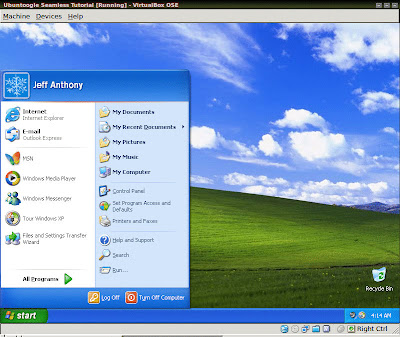
Select Install VBox Guest Additions
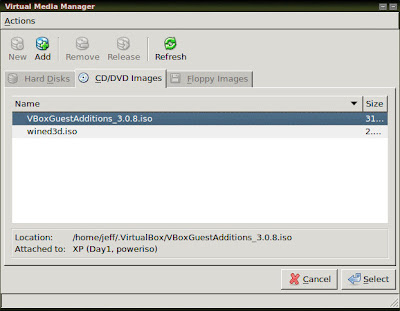
Unmount the Windows XP installation media and mount VBoxGuestAdditions_version.iso where our version is 3.0.8
You'll be greeted by an oddly familiar Windows Installation screen. Follow the Dialogue 'Next'
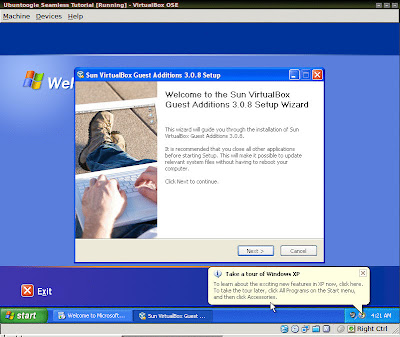
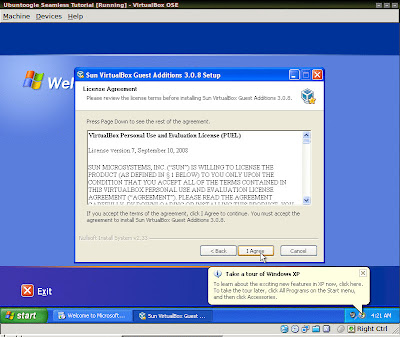
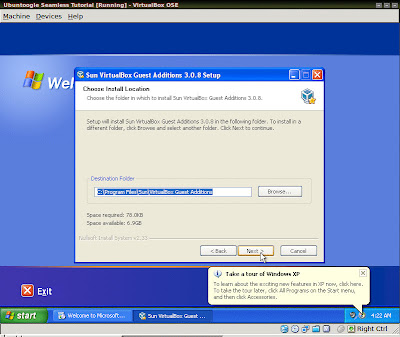
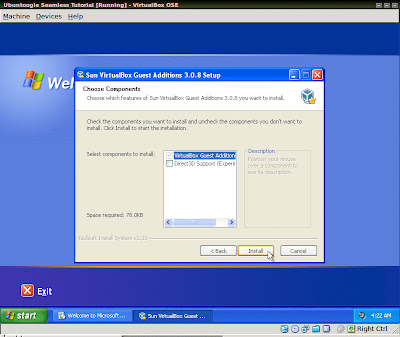
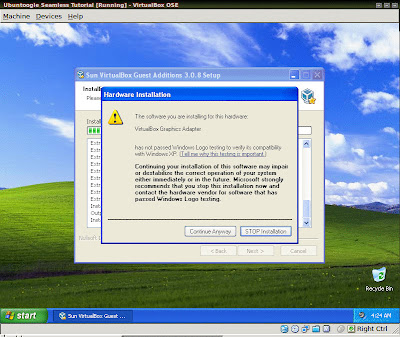
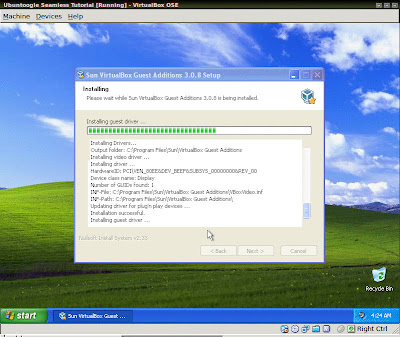
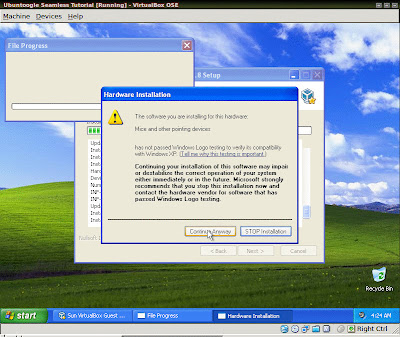
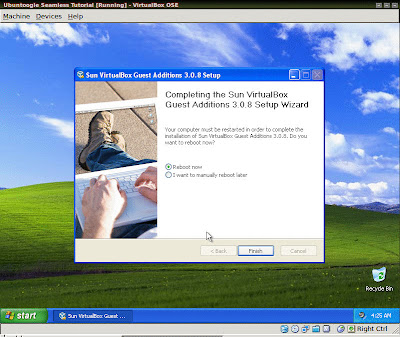
After allowing the VM to reboot you'll see some more oddly familiar tokens of greeting -- errors and other annoying system tray notifications
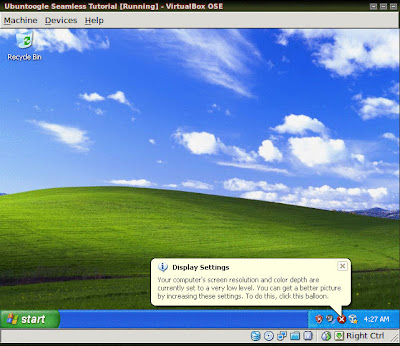
Right-click on the red shield otherwise known as the Microsoft Security Center
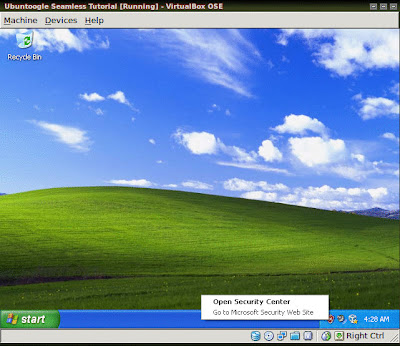
Open Security Center
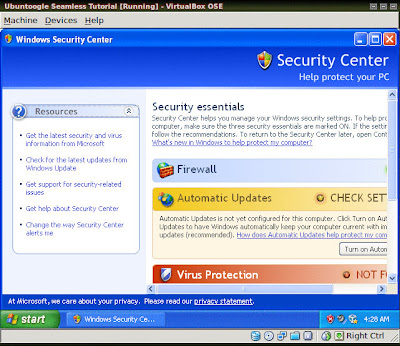
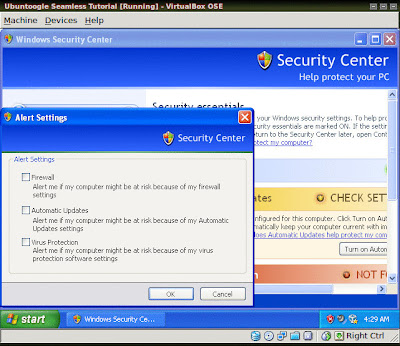
Change the way Security Center alerts me
Uncheck all the boxes unless you're planning on doing some internet and email with Windows, I don't suggest it...
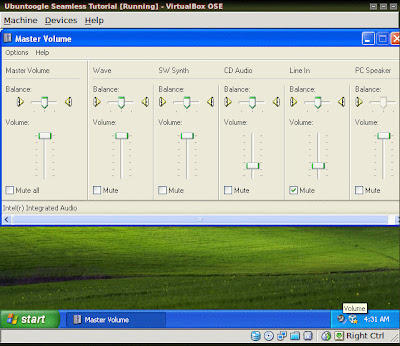
Right-click and open Volume Control
Turn the Master Volume up
Right-click the Taskbar and open Properties
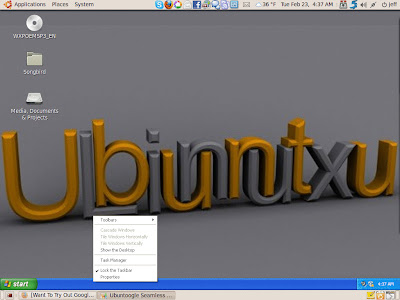
Click 'Customize'-button on the 'Always hide inactive icons' line
Change them all to 'Always Hide'
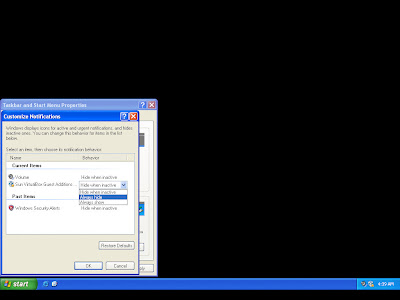
Apply and close the inactive icons window with the 'OK'-button
Check all the boxes except 'Show the clock'
Click 'Apply'-button
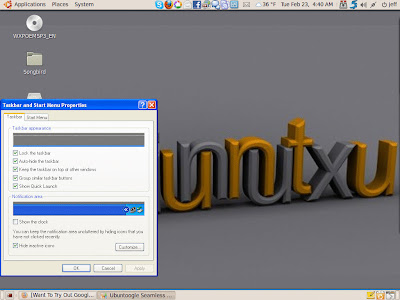
There you go! You're finished!
Here's a screenshot of my setup where I'm using Crossloop and the Silverlight Facebook Client beta on Seamless XP and you can see the Terminal in the background.

Here's a screenshot of those apps spread across the Compiz cube
Seamless XP on Ubuntu with VirtualBox - part 2 - Install XP
Once you set up your VM and insert your XP disc 'Run' the VM
It will now be installed from CD/DVD onto the partitioned area of Hard Drive
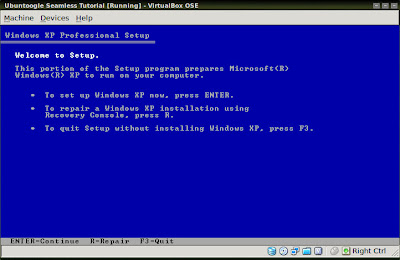 >
>
Enter
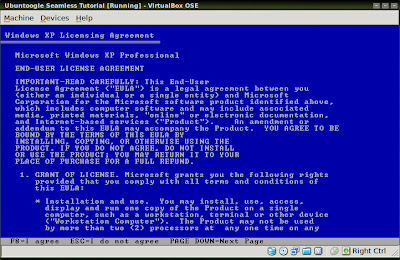
F8
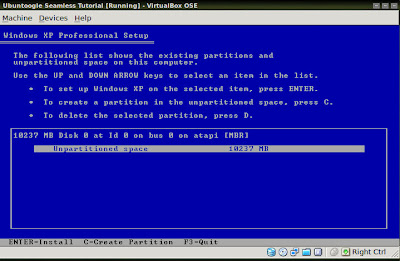
C
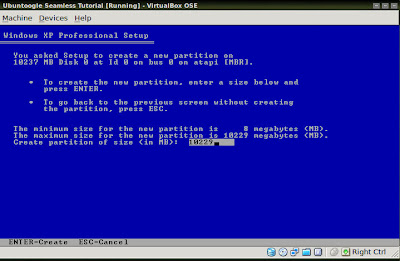
Enter
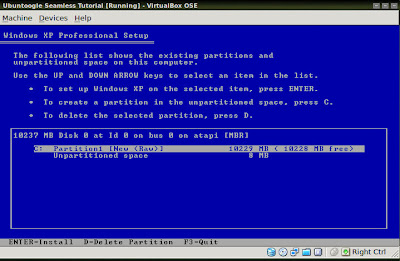
Enter
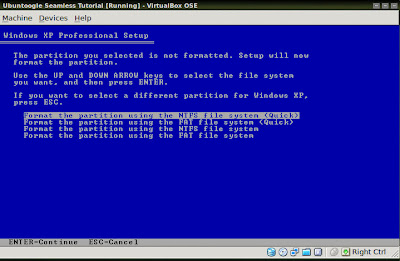
Enter
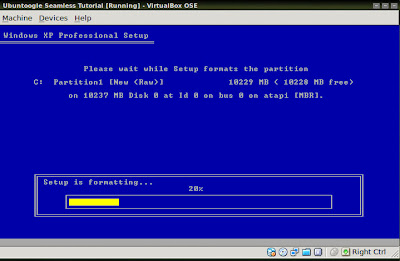
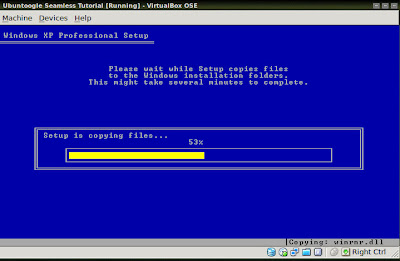
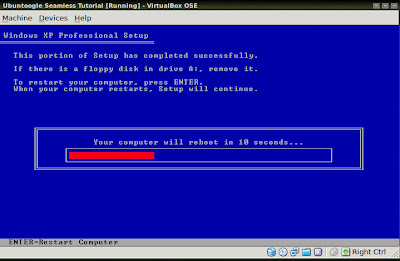
Upon reboot of the VM you will see the familiar Windows logo
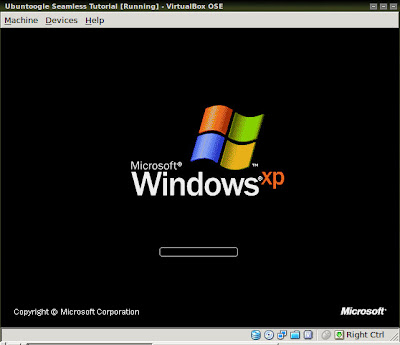
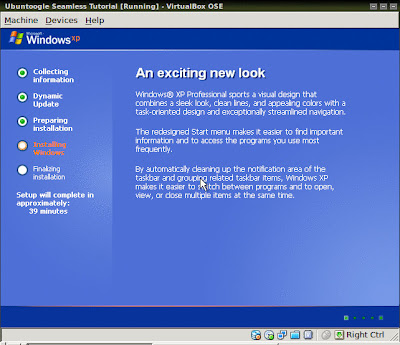
And now the real installation can begin
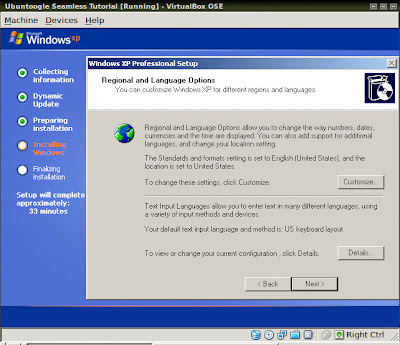
Click 'Next' on the Regional configuration window
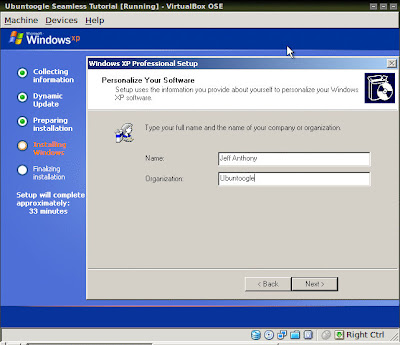
Personalize the System
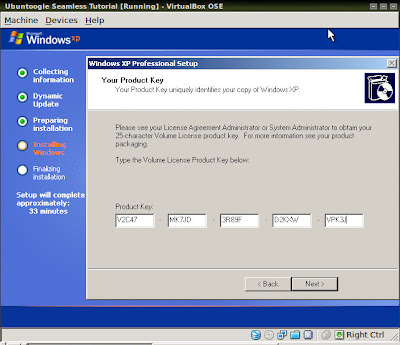
Enter your Registration key
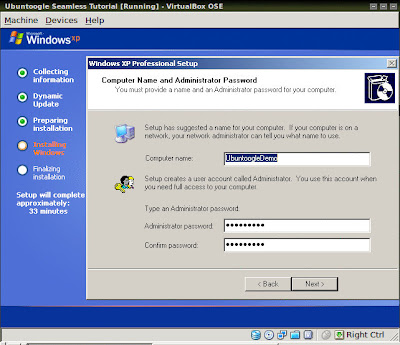
Computer Name and Administrator Password
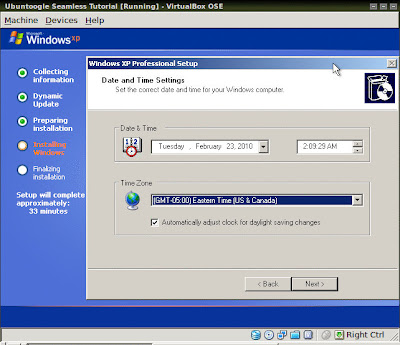
Date and Time Settings
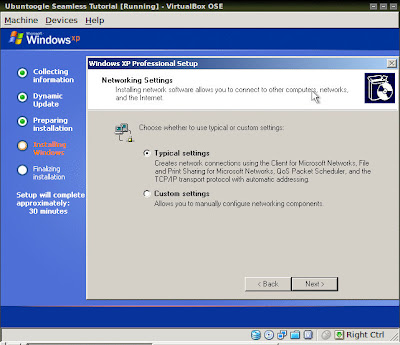
Select typical Netowrk settings
Keep the Default Workgroup unless you have reason otherwise
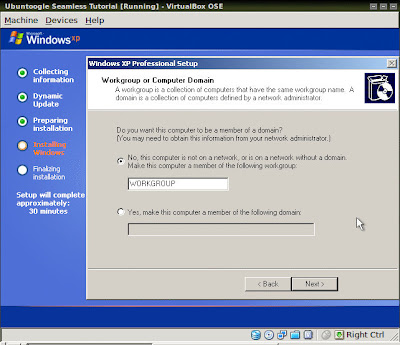
These screens made me chuckle
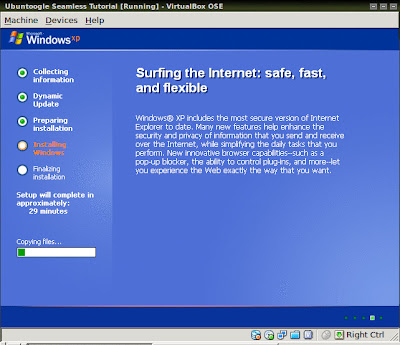
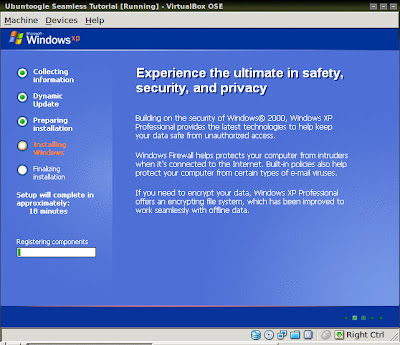
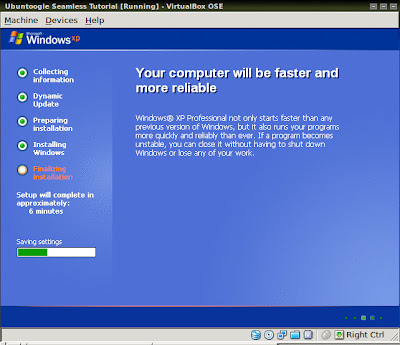
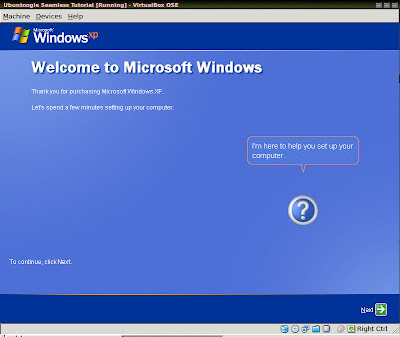
Eventually you'll see the last series of configuration screens
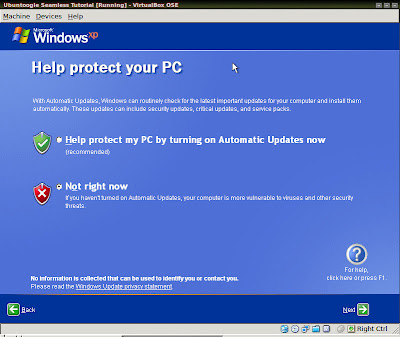
I suggest turning off Automatic Updates
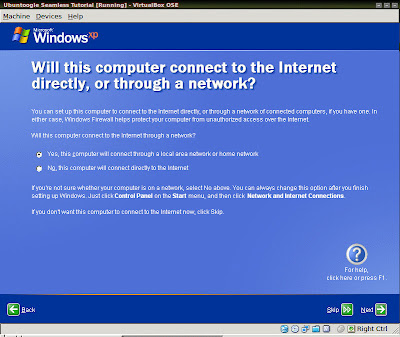
Skip Network Setup
I suggest not Registering unless you need to
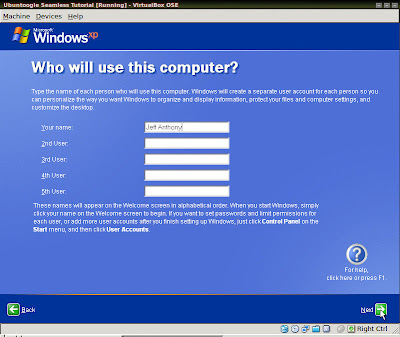
Finish
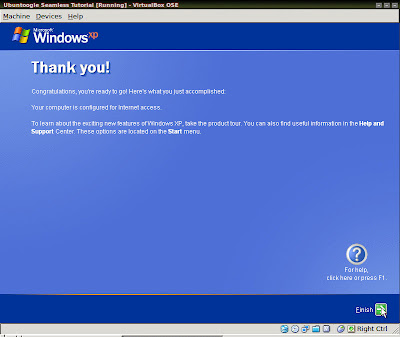
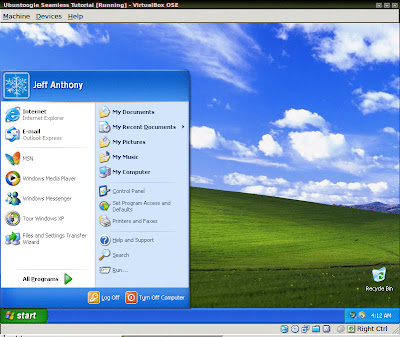
Now you've installed Windows on the VM.
From here I installed Silverlight 4 and the Silverlight Facebook client (Moonlight is not quite there yet), My Crossloop Expert assistance reverseVNC server and Everquest for playing on EQEmu.
Once you've installed whatever you like go ahead and move on to part 3 - Seamless Mode
It will now be installed from CD/DVD onto the partitioned area of Hard Drive
 >
>Enter
F8
C
Enter
Enter
Enter
Upon reboot of the VM you will see the familiar Windows logo
And now the real installation can begin
Click 'Next' on the Regional configuration window
Personalize the System
Enter your Registration key
Computer Name and Administrator Password
Date and Time Settings
Select typical Netowrk settings
Keep the Default Workgroup unless you have reason otherwise
These screens made me chuckle
Eventually you'll see the last series of configuration screens
I suggest turning off Automatic Updates
Skip Network Setup
I suggest not Registering unless you need to
Finish
Now you've installed Windows on the VM.
From here I installed Silverlight 4 and the Silverlight Facebook client (Moonlight is not quite there yet), My Crossloop Expert assistance reverseVNC server and Everquest for playing on EQEmu.
Once you've installed whatever you like go ahead and move on to part 3 - Seamless Mode
Subscribe to:
Posts (Atom)


